You can use one of the keyboard shortcut key below to perform 4 way of delete action:
delete
Delete one typed character at a time to the left.
fn + delete
Delete one typed character at a time to the right. Just like "Del" key on PC.
option + delete
Delete whole typed words at a time to the left
command + delete
Delete all typed charters to the left.
As far as I can tell this works all over Mac OS X and in most apps, including Safari, TextEdit, Terminal, Finder, iTunes, iChat, and more.
Friday, October 29, 2010


Saturday, July 10, 2010
OSX Network: Network Error (tcp_error)
If website not loaded and the following error is displayed usually it's caused by DNS cache.
-------------------------------------------------------------------
-------------------------------------------------------------------
DNS request are usually cache, that’s good as it speeds up the lookups within the same host but sometimes we will want to clear the cache so it don’t hold the values that are no longer valid.
In Leopard (Mac OSX 10.5) or Snow Leopard (10.6) to clear DNS cache , just type this in your Terminal and hit enter:
dscacheutil -flushcache
Note:
A DNS server matches the URL of a website (eg www.domain.com) with its numeric IP address - it translates www.domain.com into the unique numeric IP address (XX.XX.XX.XXX). Whenever you request a web page, your browser asks the name server to find the numeric translation of the URL.
Without the DNS servers, it would be a complicated web because we would have to know all the IP addresses rather than the nice friendly name, like Google.com.
-------------------------------------------------------------------
| Network Error (tcp_error) |
| A communication error occurred: "Operation timed out" |
| The Web Server may be down, too busy, or experiencing other problems preventing it from responding to requests. You may wish to try again at a later time. |
For assistance, contact your network support team. |
-------------------------------------------------------------------
DNS request are usually cache, that’s good as it speeds up the lookups within the same host but sometimes we will want to clear the cache so it don’t hold the values that are no longer valid.
In Leopard (Mac OSX 10.5) or Snow Leopard (10.6) to clear DNS cache , just type this in your Terminal and hit enter:
dscacheutil -flushcache
Note:
A DNS server matches the URL of a website (eg www.domain.com) with its numeric IP address - it translates www.domain.com into the unique numeric IP address (XX.XX.XX.XXX). Whenever you request a web page, your browser asks the name server to find the numeric translation of the URL.
Without the DNS servers, it would be a complicated web because we would have to know all the IP addresses rather than the nice friendly name, like Google.com.
Saturday, January 24, 2009

Tuesday, January 13, 2009
OSX: Quake II On Mac OS X
Old school game is back. One of my old time favorite, Quake II! To be able to run Quake II on Mac OS X you need:
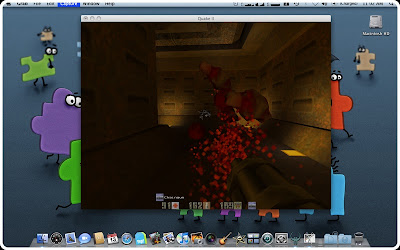
- Mac OS X v10.0 or higher. Mine Mac OS X 10.5.6
- Cocoa version of Quake II v1.1 which includes the software and OpenGL renderer plug-ins. You can download it here at fRuitz oF doJo site.
- Definitely you need retail version of Quake II. It doesn't matter if you own Classic MacOS or the PC version, both will work. Mine is PC version.
- Optional... you'll need a graphics board that provides accelerated OpenGL rendering if you want to use the OpenGL renderer instead of software renderer. Mine is Intel GMA X1300 and it's working flawlessly.
Oohhh... Sorry... I didn't mean it...
After you meet all above requirement, just follow below step to install:
- Create directory /Application/Quake II.
- Copy baseq2 folder from Quake II CD to directory /Application/Quake II.
- Open Quake2v1.1.dmg that you download from fRuitz oF doJo site earlier. Then drag Quake II application file to directory /Application/Quake II. After that go "Into 'baseq2' folder" and drag file GameMac.q2plug to directory /Application/Quake II/baseq2.
- Click Quake II application file to play.
Enjoy gaming.
Sunday, September 7, 2008
Band Used CCTVs To Record Music Video!
Could not afford a camera crew for music video? No problem for Manchester base band, "The Get Out Clause". Their were performed in front of a load of CCTV cameras around the city. Then they requested the footage from the camera operators under the "Freedom of Information Act Data Protection Act" and stitched the results together for their music video. Darn briliant.
Wednesday, July 16, 2008
Luke Jobs VS Darth Gates: The Games
Gates fans would like to have a revenge!!! Now it's the time.... Enjoy 
Luke Jobs VS Darth Gates
Hahahah... Watch it.... It's fun... Apple future product, iHome without Windows!
Subscribe to:
Posts (Atom)